

Pros
-
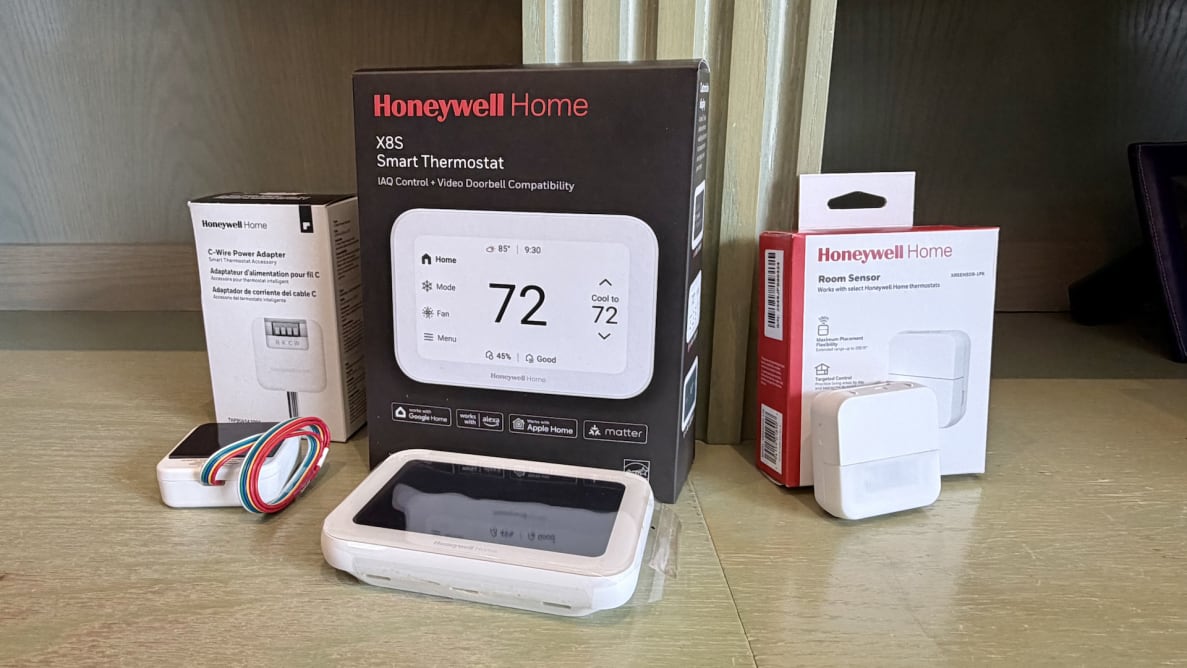
Integration with room sensors, video doorbells
-
More attractive (and customizable) than previous Honeywell Home thermostats
-
Advanced energy features like “feels like” temp, proactive alerts, grid rewards
Cons
-
Issues setting up thermostat in the app
-
No support for big doorbell brands
-
Most expensive Honeywell Home smart thermostat
About Honeywell Home X8S Smart Thermostat
- Price: $219.99 (or $249.99 with room sensor)
- Type: Smart
- Compatibility: Works with up to 3 heat/2 cool heat pump with electric backup or 2 heat/2 cool conventional systems, hot water heat, forced air (gas, oil, or electric)
- Power and connectivity: Corded electric, C-wire required, Wi-Fi 2.4 or 5.0 GHz (802.11ax/ac/a/b/g/n)
- Smart home capability: Google, Alexa, Apple Home, Matter
- App: First Alert by Resideo
- Dimensions: 0.96 inches x 5.24 inches x 3.54 inches
- Weight: 0.91 pounds
- Color: White or black
- Includes in package: Smart thermostat, UWP wall plate; screws and anchors; booklet
How we tested

While other tech journalists may take a different approach, my product-review process aims to mirror the real-world user experience: I set up and use the gear without any assistance from the manufacturer or public relations agency.
As such, the Honeywell Home X8S Smart Thermostat was unboxed, along with its optional wall plate and small installation pamphlet. As with our review of the Honeywell Home X2S Smart Thermostat, I simply replaced one of the thermostats on my wall that works with the X8S, with its dual 8-pin vertical alignment on the back, already wired for power.
Otherwise, also in the box is a sheet with a QR code to receive a free C-Wire adaptor from Honeywell Home—if you don’t have the required C-Wire to connect the new thermostat.
Once on the wall, you can set up the thermostat via the app or by following the on-screen instructions. Either way, you join the thermostat to your Wi-Fi network, sync it with the free First Alert by Resideo app (iOS, Android), and then give the location a name for easy access.
When I originally tested the Honeywell Home X8S, the device wasn’t listed among all of the thermostats in the app. I also searched for “X8S” in the First Alert search window. No dice. I had to call Honeywell Home support, and after some back-and-forth, I was advised to try one of the last options, ambiguously named “denali_device_name_x12_x11_trade,” which worked. However, in the interim of publishing this review and this update (on March 17, 2026), Honeywell Home has updated its app and now easily recognizes the X8S without issue.
What we like
It features a redesigned look and user interface
The Honeywell Home X8S proved to be a comprehensive offering for homeowners, rivaling many of the bigger names in this space. Taste is subjective, of course. The Google Nest and Ecobee thermostats are quite slick, while most Honeywell Home products look, well, more “old school,” let’s say.
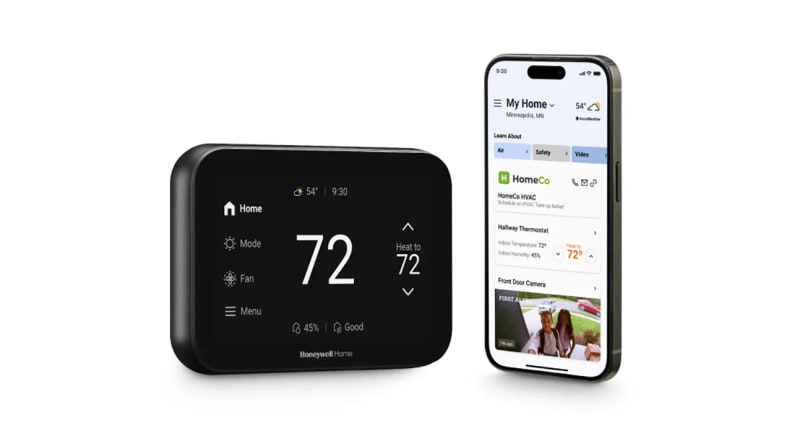
More attractive than its predecessors, the X8S is nestled somewhere in the middle, with a more modern and appealing design than previous models, with rounded edges, and a large 5-inch touchscreen that’s both good-looking and functional.
With various color and style options to choose from, the large display prominently shows the temperature, time (digital or as an analog clock), humidity, indoor air quality, and other info you can add to the main dashboard (see below). I kept the default setting for the screen to illuminate when walking up to it, which is handy. Settings and preferences can be adjusted on the thermostat itself or via the First Alert app.
Like most other smart thermostats, many functions can also be controlled with your voice via a smart speaker (supporting Google, Alexa, and Siri).
A thermostat’s accuracy and feature set are arguably more important than its looks—and thankfully, it did indeed excel in its performance, as you’ll see in the next section.
It offers advanced features and motion sensors

The Honeywell Home X8S is a feature-rich smart thermostat that offers much more than standard temperature control.
It works seamlessly with most HVAC systems, such as furnaces, air conditioners, and heat pumps, to enhance your home comfort. You can set it to decide when to turn heat or A/C on and off and automatically adjust temperature based on whether anyone is home or not; set daily or weekly schedules (such as cooling down the home every weekday at 9 pm for a better night’s rest); read info about indoor humidity and indoor air quality (IAQ); and receive reminders to wash or change the air filter.
You can choose to display “feels like” temperature that factors in both the ambient air temperature and the indoor relative humidity to calculate a perceived comfort level—similar to how weather reports use the heat index or wind chill. Smart. In other words, this opt-in feature ensures that when you set the thermostat to a specific temperature, you actually experience that temperature, not just the raw air temperature reading.
Despite some issues upon setup, the First Alert by Resideo app worked well, allowing you to see info and make changes—even when away from home.
With a smart speaker, say something like “Alexa, raise the temperature by three degrees” or simply “Siri, make it warmer.” Or you can say, “Hey Google, what's the temperature inside”? This is ideal for those with dexterity challenges or mobility issues.
This smart thermostat also supports Matter, an increasingly popular standard for smart home devices, making setup easier (QR code, numeric code matching). They work seamlessly with other products (regardless of brand or ecosystem) and generally offer faster response times, greater reliability, and stronger security.
Missing from the Honeywell Home X2S, which I also reviewed, the X8S supports small occupancy sensors to place in various rooms for more precise comfort. This lets you prioritize living areas during the day and bedrooms at night. Sensors have an extended range of up to 200 feet and can be self-standing or adhered to a wall. Not only could these devices raise or lower the room's temperature to better serve its occupants, but they can also automatically reduce energy use by detecting when a room (or the entire home) is empty. It was easy to pair the sensor to the thermostat, and it seemed to accurately provide a reading of that room’s temperature (I purposely moved it to a cooler room in the basement at one point, and it accurately dropped the temp).
In fact, the model I reviewed includes a sensor (for $249) to be purchased separately. You can even add up to 20 sensors in one home, if desired.
It features smart home integration
Resideo made a big deal about this thermostat supporting some wireless doorbells: the First Alert VX1 and Ring-branded doorbells. Once paired, when someone rings the compatible doorbell outside, you can see and talk to them from the thermostat—just like the smartphone app for these products.
It worked, yes, as the X8S was paired with our Ring wireless doorbell, but the quality of the stream wasn’t as clear or smooth on the thermostat screen as it is on the app. Also, depending on where you keep your thermostat in the home, it may not be an ideal place to talk with someone at your front door. For example, I’d argue most people have their thermostat mounted to their wall in a hallway (or maybe in a family room), but it may not be a place you’d typically talk on an intercom with someone at your front door.
And so, I’d call it a “nice to have” feature and not a “need to have.” Plus, you can’t access a live stream outside via the thermostat anytime you want—only when someone activates the doorbell.
What we don’t like
We experienced setup woes right out of the box
As alluded to earlier, the thermostat's name wasn't even listed in the First Alert by Resideo app. Read that again. And so how are you supposed to set up the thermostat, unless you opt to do so on the thermostat’s screen itself and disregard half of the functionality the app offers?
This issue has since been fixed, but when reviewing the product, I had to call Resideo support on a Saturday—thankfully, they were open—and even the tech support person had to look up how to pair this. We first tried “denali_device_name_x12_x11_retail,” which didn’t work, but the last option did, named “denali_device_name_x12_x11_trade.” Not sure how anyone could figure this out on their own. Even as someone who is quite tech-literate, I had to call to ask why the X8S isn’t listed as an option. The thermostat debuted a couple of months ago, in December 2025, so there is no excuse.
Again, to the company's credit, once Honeywell Home saw our review upon initial publication, they quickly resolved the issue.
It's difficult to pair with a doorbell

While the feature worked—you can see and talk to whoever is at your front door via the X8S—it was challenging to find and enable the doorbell feature in the first place.
If you click on the “Devices & Sensors” icon on the thermostat, you can only add another room sensor. On the app, if you tap “Devices,” it only lists the thermostat(s) you have or other smart home products supported by the First Alert app—and Ring isn’t listed here (only a doorbell called the VX1 HD Video Doorbell).
Instead, launch the app, tap Dashboard, then tap your thermostat's name, then tap the Settings cog icon in the bottom corner. Now you must scroll to the bottom of the list of options, select “Video Doorbell Linking,” and sign in with your Ring/Amazon ID. It was complicated and took a long time to find it. Even the instruction manual and website simply say to “pair your compatible video doorbell,” without providing specific steps.
There are multiple Resideo apps
There’s a lot to like about the HoneyWell Home X8S, but it’s not perfect—and much of the frustration is tied to the Resideo app. In fact, there are multiple Resideo apps at the Apple App Store and Google Play Store—including one I used to set up a thermostat just two years ago—and so it can be confusing to know that only the First Alert app is required. Even the tech support person on the phone acknowledged that many of the calls he gets are because the customer has a different Resideo app installed (including one that controlled a previous model).
Why are there multiple Resideo apps, instead of folding everything into one? At last glance, there is Resideo—Smart Home, Smart Life by Resideo, First Alert by Resideo, Resideo Pro, Total Connect by Resideo, Resideo Academy, Honeywell Home Suite, and others. It unnecessarily makes it harder to get going, and as a result, you risk customers packing it all back up and returning it.
To be clear, the app you want to use is First Alert by Resideo.
Warranty
The Honeywell Home X8S includes a 2-year limited warranty.
Should you buy the Honeywell Home X8S Smart Thermostat?
Yes, it is a very competent product that can accurately manage your home’s temperature

Yes. The Honeywell Home X8S (available at Amazon) is a highly competent product that accurately manages your home’s temperature.
Along with its core features to assess and make changes to your home’s temp for comfort and/or energy savings, and allowing you to view and control it all from afar, it works well with room sensors (and may be included in the purchase) and offers some added conveniences, like indoor air quality, a “feels like” temp, programmable schedules, reminders and alerts, video doorbell support, and more.
Honeywell Home and/or Resideo needs to support more doorbells than just Ring and the First Alert VX1—but it’s a start.
Hopefully, you’ve got the right wiring to simply replace your existing thermostat with this smarter one, but Resideo does a good job of getting you going—through the manual, instructional videos, customer care phone access, and a free C-Wire offer. The X8S is a great product, but the app issues around setup are aggravating to say the least.
Starting at $219, the X8S may be pricier than other Honeywell Home thermostat products—like the sub-$80 Honeywell Home X2S we last reviewed—but it really is packed with useful features and offers a sleeker look thanks to the redesigned hardware and customizable, colorful screen options.
Related content
-

X-Sense SC07-MR Review review
-

The Best Smart Thermostats of 2026 best-right-now

Meet the tester

Along with Reviewed and USA TODAY, Marc has been a freelance journalist for more than 20 publications, is a 16-time author (including Apple Watch For Dummies and Game Design: Secrets of the Sages), hosts the syndicated Tech It Out radio (and podcast), and is host of Tech Impact television show (on Bloomberg TV and FOX Business).
Based in Toronto, Marc specializes in consumer electronics, games and apps, smart home innovations, automotive tech, and future trends.
Checking our work.
Our team is here to help you buy the best stuff and love what you own. Our writers, editors, and experts obsess over the products we cover to make sure you're confident and satisfied. Have a different opinion about something we recommend? Email us and we'll compare notes.
Shoot us an email